
How to Build a CMMC Artifact Index Before Assessment Day
A CMMC artifact index is the list that tells your assessor where your proof lives. Build it now, and assessment day becomes a check of your work instead of a hunt for files.
CMMC Ready Now, in Leesburg, Virginia, provides CMMC compliance consulting for defense contractors: gap assessments, remediation and C3PAO preparation.
In This Article
A recent C3PAO perspective from Smithers opens with a line many owners will know: the word "assessment" brings more anxiety than clarity. A good index is how you trade the first for the second.
What is a CMMC artifact index?
It is one master list that links each requirement to the evidence that proves it. Most teams keep it in a spreadsheet.
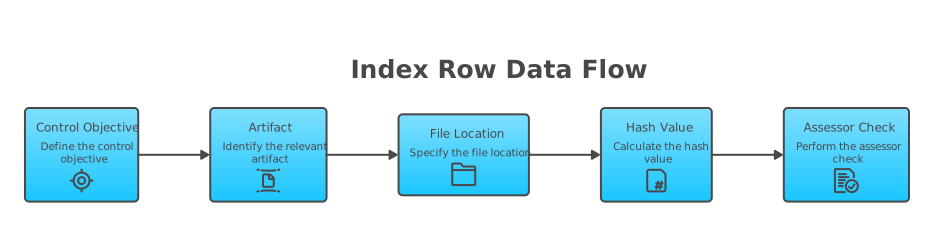
Each row covers one assessment objective. NIST SP 800-171A splits each requirement into lettered objectives. For example, AC.L2-3.1.1 has objectives [a] through [f].
A useful row has these columns:
- Control ID and objective, such as AC.L2-3.1.1[a]
- Artifact name
- Where the file or setting lives
- Method: examine, interview or test
- Owner, listed by role, not by name
- Date the artifact was created or captured
- Hash value of the file
- Scope notes, such as which systems it covers
What counts as evidence to an assessor?
Assessors use three methods from NIST SP 800-171A. They examine, they interview and they test. Your index should plan for all three.
Examine means documents and records. Think policies, procedures, screenshots, logs, tickets and training records.
Interview means people. The index should name the role that can explain each control in plain words.
Test means watching it work. An assessor may ask you to show a login or a live setting.
A policy alone rarely proves a practice. Pair each policy with a record showing the practice really happens.
How do I build the index, step by step?
- Start with your System Security Plan, required by CA.L2-3.12.4. Your index and your SSP should point to the same systems.
- Confirm your scope. List your CUI assets, security protection assets and any other asset categories you use.
- List every objective for all 110 Level 2 requirements.
- Map at least one artifact to each objective. One document can cover many objectives.
- Use one naming pattern for files, such as control ID, short title and date.
- Assign an owner role to each row for interviews.
- Freeze the final files and record a hash for each one.
- Run a mock walkthrough. Have someone pick random rows and find the proof fast.
Which controls trip people up on evidence?
These are common places where the policy exists but the proof is thin.
- AU.L2-3.3.1, system auditing. A settings screenshot shows logging is set up. A log sample shows it actually works.
- IA.L2-3.5.3, multifactor authentication. Pair the policy with the configuration, and be ready to show a live login.
- AT.L2-3.2.1 and AT.L2-3.2.2, training. Keep records with dates and who finished each course.
- PS.L2-3.9.2, personnel actions. Keep offboarding tickets that show access was removed.
- CM.L2-3.4.1, baseline configurations. Show the baseline document and proof that systems match it.
When in doubt, ask one question. Would a stranger believe this control works, based only on this file?
How long do I keep the evidence, and why hash it?
The DoD CMMC Level 2 Assessment Guide says you keep the artifacts yourself. It calls for keeping them six years from your CMMC Status Date.
The guide also calls for hashing artifacts. A hash is a digital fingerprint of a file. If the file changes, the fingerprint changes.
The assessor records the artifact names and hash values. Later, anyone can prove your files were not altered. DoD publishes an artifact hashing tool guide to help with this.
When your Level 2 certification will be required under your contracts is not settled while Phase 2 remains suspended. Evidence work does not depend on that date.
Does this matter if I only need Level 1?
Yes. Level 1 is a self-assessment, but you still affirm that you meet every requirement. An index backs up that affirmation.
Keep it small. Map proof to each of the 15 Level 1 requirements, from AC.L1-B.1.I through SI.L1-B.1.XV.
For example, SI.L1-B.1.XII covers fixing system flaws. Patch reports with dates are strong proof.
Would Your Evidence Hold Up?
Check each requirement against its assessment objectives before your assessor does. CMMC Ready Now can walk through it with you.
Book a Call with RickFrequently Asked Questions
What is an artifact in CMMC?
An artifact is any record that proves a control is in place. It can be a policy, a screenshot, a log, a ticket, a training record or a configuration export. Assessors review artifacts when they examine your environment, alongside interviews and live tests.
How many artifacts do I need for each control?
There is no fixed count. You need enough evidence to show each assessment objective is met. Some objectives need one strong file. Others need a policy plus a record that shows the practice in action.
Can one document cover more than one control?
Yes, one artifact can support many objectives. Your SSP or an access control policy often covers several. List that artifact on every row it supports, so the assessor can find it from any control.
Do assessors take copies of my files?
Under the DoD Level 2 Assessment Guide, you keep the artifacts. The assessor records the artifact names and their hash values. That record lets anyone confirm later that your files were not changed after the assessment.
What does this mean for my business?
It means less stress and less wasted time on assessment day. A clear index shows assessors you run your program on purpose. It also exposes weak evidence early, while you still have time to fix it.
Sources
- 32 CFR Part 170, CMMC Program rule (eCFR) (ecfr.gov)
- DoD CIO CMMC Resources and Documentation (dodcio.defense.gov)
- NIST SP 800-171A, Assessing Security Requirements for CUI (csrc.nist.gov)
- Smithers, What to Expect During a CMMC Assessment: A C3PAO's Perspective (smithers.com)
- CyberSheath, DIBCAC Assessment Guide (cybersheath.com)